title: "Snap a photo of your fridge and get dinner in 30 seconds" description: "Snap & Cook uses AI vision to scan your ingredients and suggest meals you can actually make tonight — no recipe hunting, no wasted food." publishedAt: "2025-01-15" author: "Dipak" category: "snap" tags: ["snap and cook", "ai", "ingredients", "quick dinner"]
You open the fridge at 6 PM. There's chicken, half a red onion, some wilting spinach, leftover rice, and a lemon that's been there for two weeks.
You could Google "what to make with chicken and spinach." You'll get 47 recipes, none of which use exactly what you have, most of which require a trip to the store.
Or you could take a photo.
How Snap & Cook works
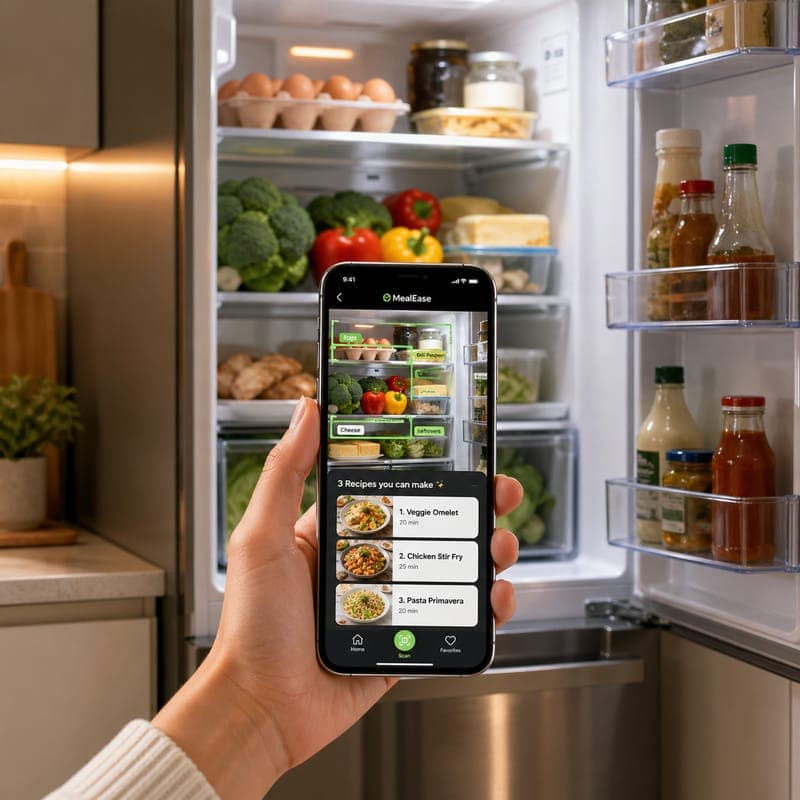
Point your phone at your fridge, your pantry shelf, or your counter. Snap & Cook's AI vision scans what it sees and identifies your ingredients — automatically.
Within seconds, it suggests meals you can make right now with what you have. Not recipes that require 12 ingredients when you have 6. Actual meals, from your actual fridge.
What the AI sees
The vision model is trained to recognize:
- Raw proteins (chicken breast, ground beef, fish fillets, tofu)
- Vegetables and produce (even if they're a bit past peak)
- Pantry staples (rice, pasta, canned goods, oils, spices)
- Dairy and condiments
- Leftovers in containers (it reads labels when visible)
It doesn't just list ingredients — it understands what they can become together.
The suggestions it gives you
For each scan, you get 3–5 meal ideas ranked by:
- Feasibility — how closely the recipe matches what you have
- Time — quick options first on weeknights
- Variety — it won't suggest chicken three nights in a row if your history shows you've been eating it all week
Each suggestion shows you what you have, what you'd need to add (if anything), and a simple cooking guide.
Why this beats recipe apps
Recipe apps start from the recipe and work backward to your fridge. You find something that looks good, then discover you're missing three ingredients.
Snap & Cook starts from your fridge and works forward to dinner. The constraint is what you have — not what a recipe assumes you have.
That inversion matters. It means less food waste, fewer last-minute store runs, and dinner that actually happens instead of getting abandoned for takeout.
The free vs. Plus difference
Free accounts get 3 Snap & Cook scans per week — enough to try it and see how it works.
Plus accounts get unlimited scans. If you're cooking most nights, unlimited is the one you want.
The scan takes 10 seconds. Dinner takes 20 minutes. The decision takes zero.
— Dipak
Dinner without the nightly reset
Turn tonight’s idea into a plan.
Scan the fridge and cook from what is already there.
About the author
Dipak is a MealEase co-founder and product builder focused on turning daily dinner decisions into simple household workflows.
How we created this guide
This guide was written from MealEase product workflows, common household meal planning patterns, and the practical questions families ask around snap & cook.
Downloadable planning tools
Get the next one in your inbox.
One email a week, never more. Cancel anytime.