title: "Best AI meal planner with fridge scan for weeknight dinners" description: "What to look for in an AI meal planner that scans your fridge, understands what you already have, and turns ingredients into realistic dinners." publishedAt: "2026-05-02" author: "MealEase Editorial" category: "snap" tags: ["AI meal planner with fridge scan", "fridge scan app", "Snap and Cook", "ingredient scanner"] coverImage: "/cards/snap.jpg"
The best AI meal planner with fridge scan does not begin with a blank recipe search.
It begins with your actual kitchen: the half bag of spinach, the chicken you forgot to freeze, the cooked rice from last night, the jar of salsa, and the vegetables that need to be used before they give up.
That is the difference between a recipe idea and a dinner system.
Why fridge scanning matters
Most meal planning tools assume you are starting from a shopping list. Real weeknights are messier.
You already have food. Some of it is fresh, some is leftover, some is pantry backup, and some is almost expired. If the planner ignores that, it creates more work.
An AI meal planner with fridge scan should help you:
- use ingredients before they spoil
- avoid duplicate grocery purchases
- build dinner from what is already paid for
- spot quick combinations you would not have searched for
- reduce the 6 pm decision spiral
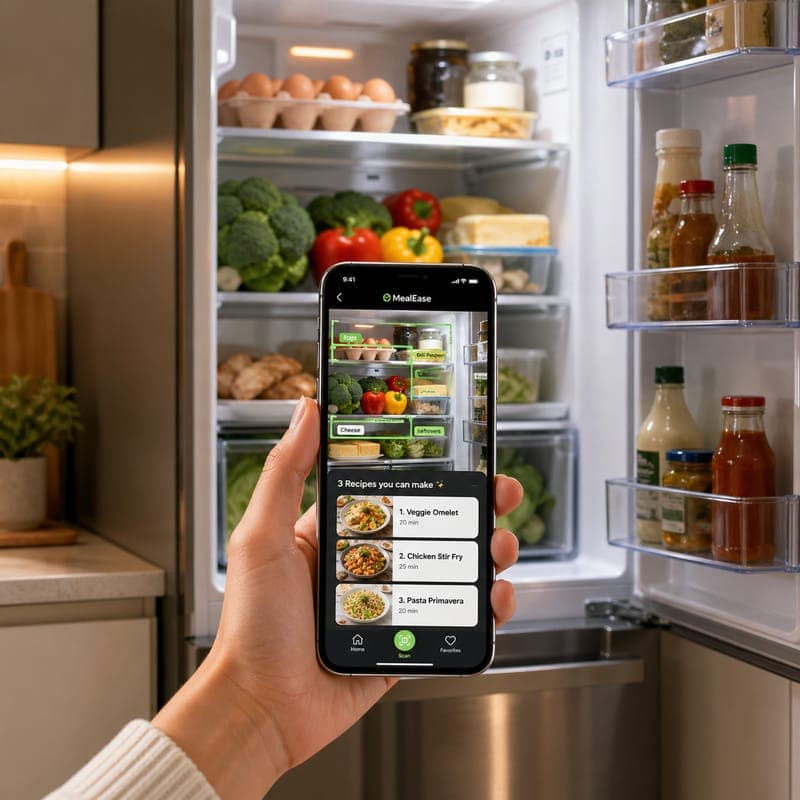
That is why MealEase built Snap & Cook around the ingredients you already have.
What a good fridge scan should detect
A useful scan is more than object recognition.
The app should understand food categories and dinner potential. Chicken breast, tortillas, shredded cheese, salsa, and lettuce are not five random objects. They are tacos, quesadillas, rice bowls, or a chopped salad depending on time, diet, and household preference.
Look for a scanner that can handle:
- proteins, produce, grains, dairy, and condiments
- leftovers in containers when visible
- pantry staples that complete the meal
- missing ingredients that are optional, not mandatory
- realistic substitutions
The goal is not perfect inventory. The goal is a dinner you can actually cook.
What happens after the scan
The scan is only the first step. A strong planner should turn detected ingredients into ranked meal suggestions.
MealEase uses your kitchen context alongside household preferences, budget goals, and recent meals. That means the suggestion is not just "chicken pasta." It can account for whether your household has eaten pasta twice this week, whether someone avoids dairy, and whether tonight needs to be fast.
For deeper pantry workflows, see our guide to pantry meals with no shopping.
How this helps with grocery costs
Food waste is grocery spending in disguise.
When a planner starts with your fridge, it naturally pushes existing ingredients into the plan. That reduces repeat purchases and helps expensive items like meat, berries, herbs, and cheese get used while they still taste good.
Pair fridge scan with Budget Intelligence and you get a practical loop: scan what you have, cook what is at risk, and shop only for what completes the week.
The bottom line
If you want an AI meal planner with fridge scan, do not evaluate it by how many recipes it can generate.
Evaluate it by how quickly it can answer this question:
What can I cook tonight with what I already have?
That is the weeknight job. Everything else is extra.
Dinner without the nightly reset
Turn tonight’s idea into a plan.
Scan the fridge and cook from what is already there.
About the author
The MealEase Editorial team writes practical guides based on the app workflows, household planning patterns, and common dinner problems families bring to MealEase.
How we created this guide
This guide was written from MealEase product workflows, common household meal planning patterns, and the practical questions families ask around snap & cook.
Downloadable planning tools
Get the next one in your inbox.
One email a week, never more. Cancel anytime.